
Waiting Game
Top 10 Best Video Game Loading Screens of All Time!
Loading screens were once the bane of every gamer’s existence. Blank voids or spinning logos would steal precious playtime, and this was especially frustrating for players who had become accustomed to lightning-fast cartridges. Some developers turned necessity into creativity, however, and they found ways to transform forced pauses into moments of fun, tension, nostalgia, or even storytelling. From hidden minigames and clever disguises to atmospheric interludes and unexpected surprises, this list covers ten of the most memorable and inventive loading screens in gaming history. This countdown proves that even waiting can be worth the wait!
10
Ramen Noodle Minigame
Dragon Ball Z: Budokai Tenkaichi 3
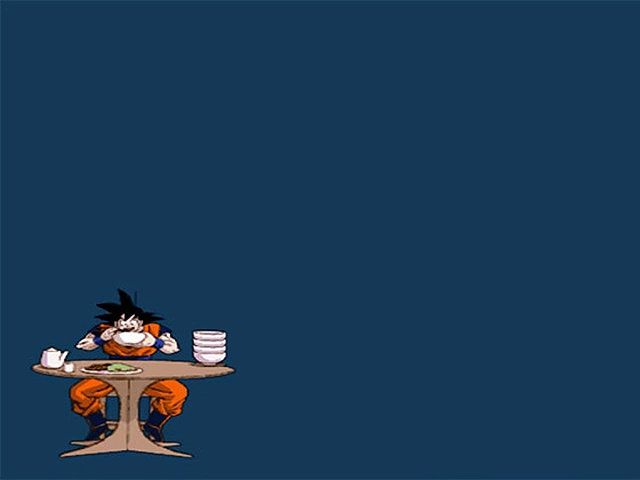
The PS2-era Dragon Ball Z games had many interactive loading screens that are worth mentioning on this list. The most iconic one can be found in Budokai 3. While the game is loading, players can rotate the analog sticks to plant Saibamen in a barren field. The faster you rotate, the more will appear. Every once in a while, a rare red Saibaman will show up as a bonus. It’s fun to fill the screen with the saddistic creatures, but you’ll have to be mindful of collateral damage. Anyone who played the first Mario Party knows that fervently rotating an thumb stick isn’t good for the controller (or your hand). For this reason, I was more partial to interactive loading screens that simply required me to mash a button rapidly. Budokai Tenkaichi 3 actually had three different minigames that were chosen at random. One involved Vegeta doing as many push-ups as possible while another saw Gohan awkwardly pulling as many swords out of the ground as he could. My favorite loading screen was the one where Goku was stuffing his face with ramen noodles. You can make Goku eat faster by repeatedly hitting the action button, and it’s fun to see all of the bowls pile up. It’s a simple little scene, but it perfectly captures Goku’s personality.
9
Bonus Heart Chance
Rayman Legends
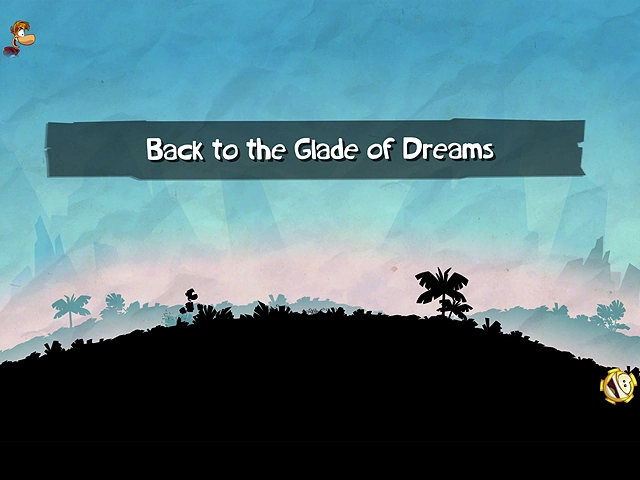
The loading screens in Rayman Legends transport players to a small silhouetted area where they can freely run around and practice Rayman’s moves. Before nearly every stage, a floating heart vial will appear. If your timing is off, the opportunity will pass you by. If you act fast, you’ll be able to grab the heart and bring it with you into the next stage. This heart effectively gives you an additional hit point for the duration of the level, so it’s well worth the effort. The loading area couldn’t be more straightforward, but you’ll still have to keep your wits about you since you’re not given a lot of time to react. This is especially true on modern platforms with SSDs, as you barely have time to obtain the bonus heart. Loading screens tend to be boring or tedious, and most players would prefer to avoid them altogether. Rayman Legends is a rare example where you’ll wish that a loading screen was longer. Nobody wants to miss out on a bonus heart, after all, as it provides you with an obvious safety net. The load times in the Switch version could be obnoxiously long, however, which proves that players can run out of patience even if they’re being rewarded for it.
8
Zombie-slaying Minigame
Onechanbara: Bikini Samurai Squad
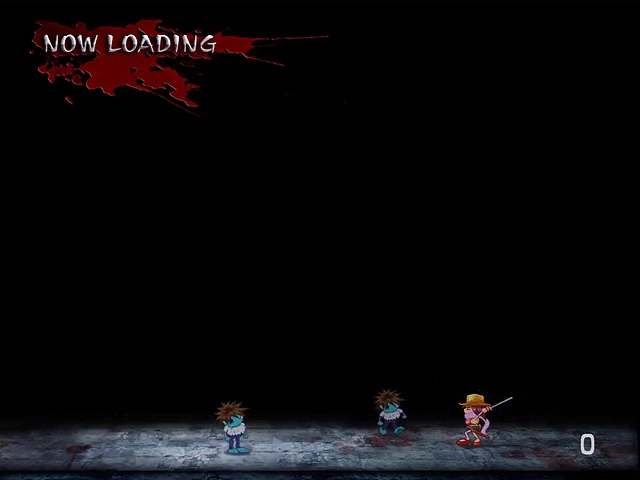
Onechanbara: Bikini Samurai Squad is a game that has way too many loading screens for my liking. The load times would be almost unbearable if they didn’t feature a charming minigame. As the game loads, the bottom of the screen turns into a cute 2D side-scroller. You control a super-deformed version of the bikini-clad protagonists, and you’re bombarded with endless waves of undead enemies. As zombies shuffle in from the side of the screen, you fend them off your trusty katana. You earn gold coins for every enemy you dispatch, and you can potentially rack up hundreds of kills before the next scene loads. Onechanbara is largely defined by over-the-top gore and shameless sex appeal, so it was a bit of surprise to see chibi assassins gleefully carving through goofy zombies. Reviewers were not kind to Onechanbara, but nobody seemed to take issue with the minigame. A lot of people maintain that it’s more fun than the game itself! It’s a simple button-mashing fun that perfectly highlights the game’s self-aware silliness.
7
Journal Entries
NieR
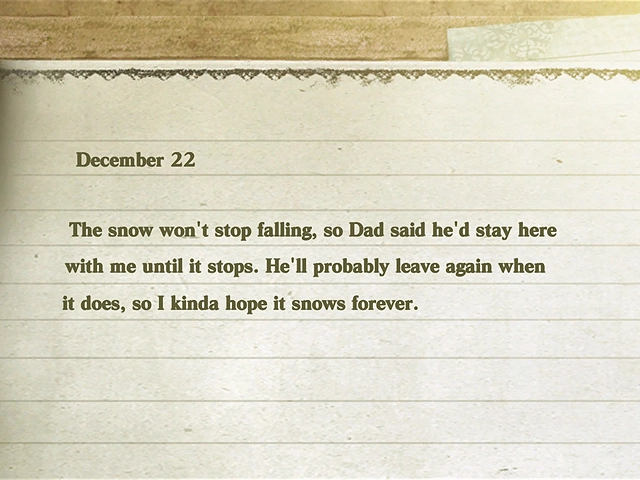
The plot of NieR: Replicant (and the original NieR: Gestalt) revolves around an ill girl named Yonah, and the loading screens feature snippets from her diary. The protagonist is away for long stretches to find a cure for what ails her, and these entries provide a window into Yonah’s daily life and her deteriorating health. The entries change as the story progresses, and we’re given insight into her loneliness, her attempts to cook, and her interactions with other characters from her hometown. The text appears in a child-like font, and this makes the entries feel intimate and personal. (This was an intentional design choice mean to heighten the player’s emotional attachment and sense of guilt for being away.) A lot of lore and hidden mysteries are hidden within these writings, and they let you know that time marches forward even when you’re not around. In the 2021 remaster, the game often loads before you have time to finish reading the text. You’ll be prompted to press a button before you continue, however, so you won’t have to worry about missing anything important. It should be noted that the tone changes depending on whether you are playing Replicant or Gestalt, since Yonah’s relation to the protagonist differs from one version to the next. The entries can focus on the dynamic of two siblings trying to survive alone, or they may be framed around a child’s adoration for her father. In either case, her diary entries serve as a poignant narrative bridge.
6
Paw Print Minigame
Ōkami
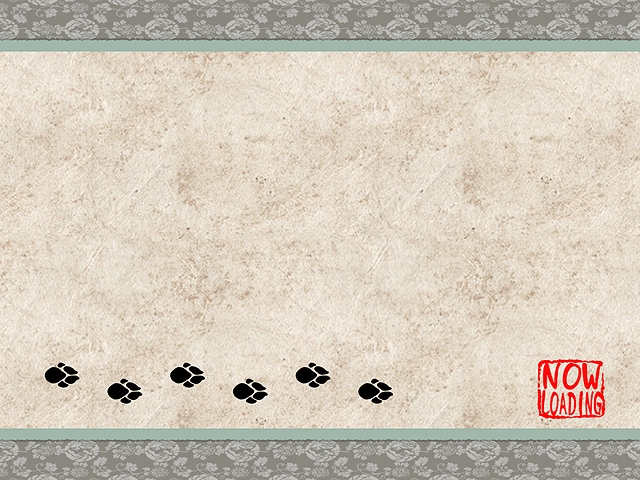
In Ōkami, players can potentially acquire unique items and weapons by trading Demon Fangs with certain merchants. Although this form of currency can be obtained through various means, it can be quite tedious to amass in large quantities. Fortunately, it’s possible to gain some extra fangs while the game is loading between scenes. There are two separate minigames that will show up, and both of them are fun. One of the games simply challenges you to mash the action button as fast as possible in an effort to fill the screen with paw prints. If you create fifty prints before the loading has completed, you’ll be rewarded for your efforts. There’s also a neat little rhythm game where you’ll have to tap the button in time with paw prints that appear along the bottom of the screen. Naturally, succeeding in ether of these minigames will earn you some extra Demon Fangs. These minigames were a godsend in the original PS2 version, but they became less important with each passing generation due to the improved loading times. The Wii and PS3 versions removed the minigames completely, while subsequent ports give players the option of turning them back on if they wish to play the game in the manner it was originally presented.
5
Classic Box Art Homages
3D Dot Game Heroes
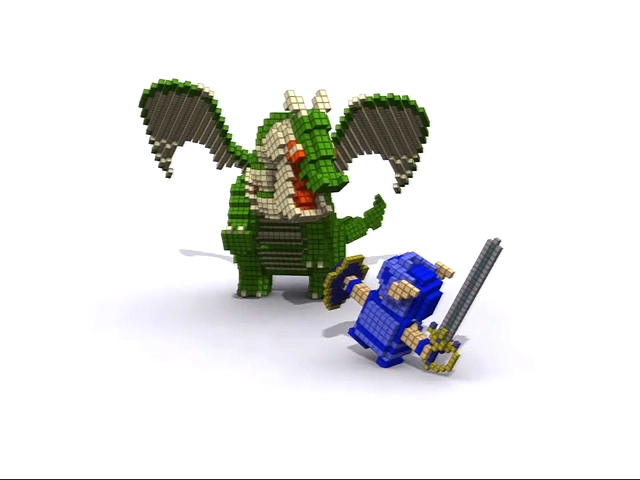
3D Dot Game Heroes is a creative action-RPG that uses voxel-based graphics to emulate the look and feel of classic games like The Legend of Zelda, Final Fantasy Adventure, and Dragon Quest. The story revolves around a 2D pixelated kingdom that has been converted to 3D, and the game is filled with affectionate parodies of various gaming tropes and clichés. Some of the most endearing callbacks happen while the game is loading. The loading screens faithfully recreate classic box art from the 1980s and ’90s with a distinct voxel twist. There are over a hundred unique loading screens in total, and each one could be considered a loving homage. Some of my favorite boxes were reproduced – including Chrono Trigger and Out of This World – and there are also plenty of deep cuts and Japanese exclusives in rotation. The screens are displayed randomly, so it might take a while to discover them all. It’s always a treat when a new one is displayed, however, and you’ll be hit with nostalgia every time you see one that you recognize. All of the loading screens can be seen in this video, along with the respective artwork that inspired them.
4
Training Room
Bayonetta
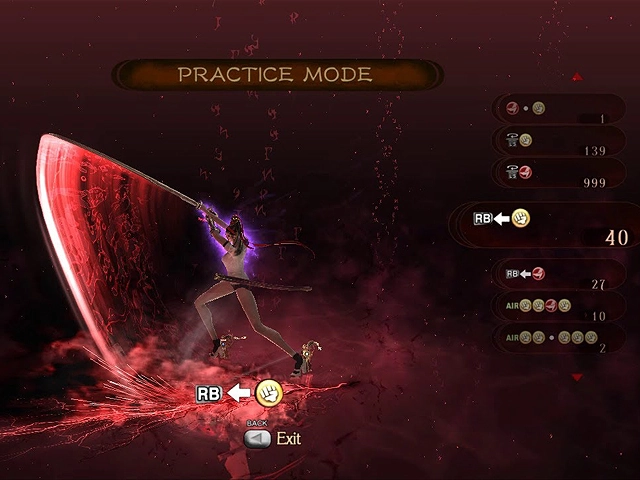
The loading screens in Bayonetta give players a dedicated training space where they can pracice combos and advanced techniques. Players have a wide assortment of weapons and maneuvers at their dispsoal during the game, but it can be difficult to process everything when you’re in the middle of a stylish battle. The training screens provide you a safe place where you can work on timing and spacing without worrying about waves of supernatural enemies crashing the party. Your movelist will be clearly shown on the screen, and it’s easy to follow the correct rhythm since the appropriate delays in each combo are clearly indicated. I’m someone who tends to skip tutorial modes, but Bayonetta found a creative way to take me to school. This screen was ideal for the Xbox 360 and PlayStation 3 releases, but subsequent ports on modern platforms can load almost instantly. Fortunately, players can choose to stay in the training void with the simply touch of a button. You know a loading screen is doing something right when players don’t want it to end. Bayonetta 2 and 3 expanded upon the training room concept by allowing players to spawn enemies to practice against.
3
Door-opening Animation
Resident Evil
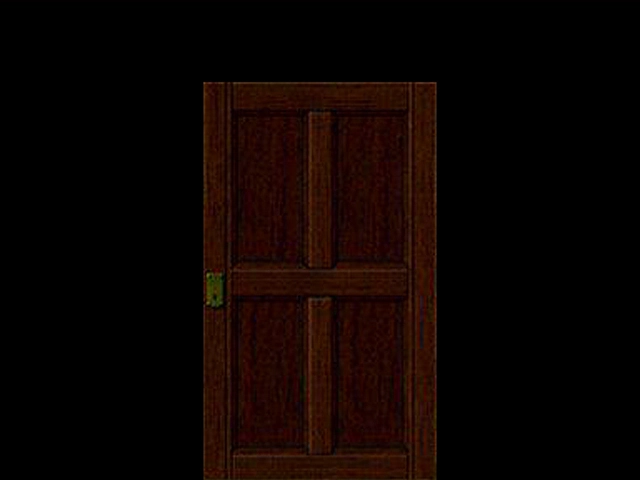
When entering a new room or area is Resident Evil, a brief first-person door-opening animation is often played. These iconic animations were initially conceived to mask loading times, but they became an important part of the game’s visual identity. While later versions of Resident Evil on PC or modern consoles could theoretically skip these, they were often retained for atmospheric purposes. In fact, some modern remasters still force these animations because they are used to synchronize game logic or preserve the intended pacing. The eerie door animations always feel like the calm before the storm, and you can never be sure what’s waiting for you on the othe side. Interestingly, these transitions were first used in Capcom’s own Sweet Home. Released in 1989 exclusively for the Famicom Disk System, Sweet Home was the main inspiration behind Resident Evil. The door-opening cinematics were basically required in that game, since the FDS floppy discs were considerably slower than Famicom cartridges. Sweet Home deserves credit for doing it first, but Resident Evil obviously made a bigger impact. To this day, the door animations are intrinsically linked with Resident Evil.
2
Loading Hallways
Castlevania: Symphony of the Night
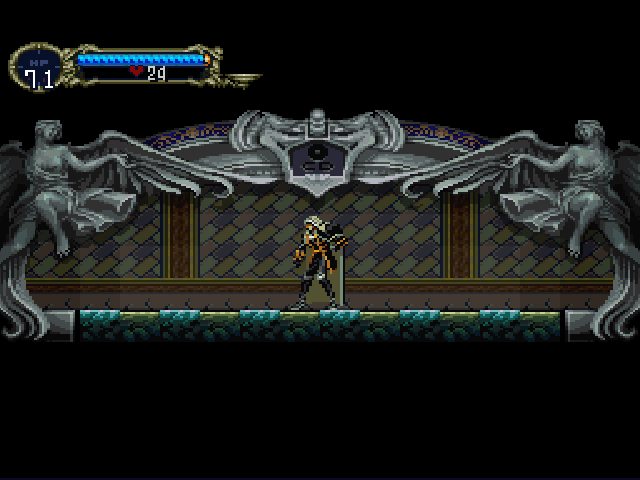
Konami’s approach to loading screens in Symphony of the Night was so subtle that many people don’t even recognize them as such. The developers effectively hid the loading areas within short, innocuous corridors. Players retain full control over their character as they proceed through these hallways, and the game quietly loads the next area behind the scenes. The hallways themselves are deliberately plain, so nothing visually demanding happens that could impact the loading process. The stone walls have a distinct “CD” engraving to indicate that it’s loading from the disc, but that’s the only visual cue players are given. (Alucard walking across the screen in one of these areas could be likened to a progress bar advancing, but it’s a lot less jarring since the player stays in control.) The game could not function properly if these loading areas didn’t exist, and if you try to skip the hallways with an emulator or advanced speedrnuning technqies, you may run into unloaded black voids or softlocks. The hallways use the same principle as the “loading tunnels” or forced narrow passageways that modern games employ. In this sense, they could be considered the grandfather of every elevator loading trick that followed. It’s often said that the best loading screen is no loading screen at all. This wasn’t a viable option for a PS1 game in 1997, so Konami found a way to make the loading process as invisible as possible. Decades later, it’s still one of the most elegant ways a game has ever hidden its technical limitations.
1
Galaxian
Ridge Racer
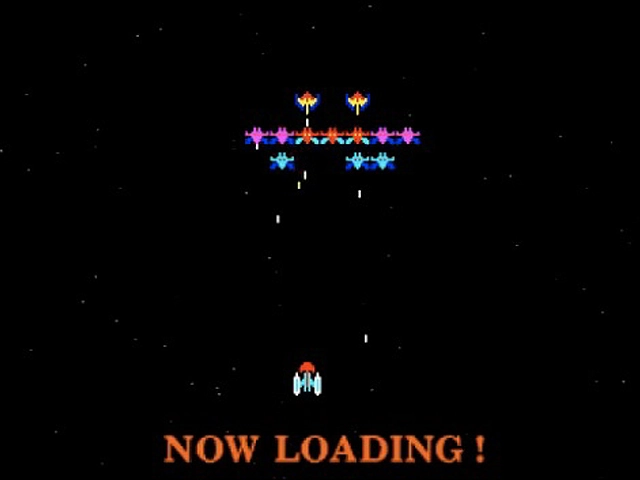
Ridge Racer was one of the killer apps in the PlayStation’s launch line-up, and Namco went to great lengths to bring their arcade smash to Sony’s newly-minted hardware. Many concessions had to be made during the porting process, however, and the developers felt compelled to do something about the loading times that were associated with optical media. (Disc-based games had been around for a while by this point, but they became the de facto standard during the PlayStation generation.) Although Namco couldn’t eliminate loading times completely, they used a simple distraction technique to mitigate the issue. While the main game is being loaded, players can pass the time with a quick round of Galaxian. This doesn’t make the game load any faster, of course, but it keeps players engaged. Namco used a similar trick for the PS1 port of Tekken, swapping out Galaxian with Galaga. In essense, Namco was using their legacy titles to make their modern releases more enjoyable. After proving the concept, Namco filed a formal patent in 1995 to reduce “time wastage” in video games. The scope covered “auxiliary games” that would be playable while the main game’s data was still being processed. This concept wasn’t entirely new, however. Beginning in 1987, many Commodore 64 games allowed users to play a Space Invaders clone called Invade-a-Load while games loaded from cassette tapes. Nevertheless, the US Patent Office accepted Namco’s filing as a unique application for optical disc-based platforms. Loading times were a big concern on the PS1, and Namco found a creative solution on day one.
Published: June 3, 2026
Do you agree with this list? Let us know what you think by leaving a comment below. Your opinion matters!